AudioControl · ACR-1
AudioControl ACR-1 Review: A Simple Dash Remote for Bass
The AudioControl ACR-1 is a $32 wired dash knob that trims bass level on select AudioControl converters, processors and amps. Research-based review, no hands-on test.
Pros
- Works with a long list of current and legacy AudioControl products, including the Epicenter and LC-series units
- Includes a 20 ft cable, longer than the 16.5 to 19.75 ft cables listed for the Rockford, Kicker and JL knobs checked here
- Needs no power connection, according to the AudioControl user guide
- Mounts under the dash with its bracket or flush with three small drilled holes
- Metal housing and a two-colour LED that shows the control position
- AudioControl's $32 price is below the $37.99 to $59.99 retailer listings found for three rival brand-specific knobs
Cons
- Works only with selected AudioControl products, and EPIC series amplifiers need the separate ACR-E
- Attenuates only, listed as 0 to -19 dB on the LC2i family, and on the LC2i PRO it cannot exceed the unit's own dial
- Already included with some converters such as the LC2i PRO, so many buyers do not need a second one
- Prices and warranty details are inconsistent across sellers, from $32 to $45 or more and one year versus five
- One owner comment mentions a stiff knob and an LED that does not go fully dark at minimum
- No independent measurements found, so taper and noise performance are unpublished
Specifications
| Attenuation range | 0 dB to -19 dB (as listed by Crutchfield for the LC2i and LC2i PRO) |
|---|---|
| Cable | 20 ft phone-style cable, listed as RJ-11 in the user guide |
| Compatible products | Epicenter Concert Series, LC2i, LC2i Pro, LC5i Pro, LC6i, LC7i, LC7i Pro, Matrix Plus, LC-1.800, LC-1.1500, LC-4.800, LC-5.1300, LC-6.1200, A800.1, A1500.1, A600.4, A1100.5, ACM-1.300, ACX-300.1, ACX-600.1, ACX-650.5 |
| Dimensions | 1.75 in W x 2.5 in D x 1.0 in H (AudioControl) |
| EPIC series amps | Not on the ACR-1 list; AudioControl sells the ACR-E for those |
| Flush-mount holes | 9/32 in (7 mm) control, 3/32 in (2.3 mm) lock tab, 1/8 in (3 mm) LED |
| Housing | Metal housing with removable integrated mounting tabs |
| In the box | ACR-1 and 20 ft cable; mounting screws not confirmed on the product page |
| Indicator | Two-colour LED that brightens as output rises (Crutchfield) |
| Legacy support | LC6, LC8, Overdrive Plus, 6XS, original Epicenter (bypass not supported) |
| Power | None required (AudioControl user guide) |
| Type | Wired dash remote level control with LED indicator |
| Warranty | 1 year per AudioControl; some retailers list 5 years |
| Weight | 2.3 oz (65.2 g) |
Verdict
The ACR-1 is a simple wired dash knob that trims bass or channel level on supported AudioControl converters, processors and amplifiers, and it is the Epicenter's replacement remote. Its strength is one job done across a long compatibility list with a 20 ft cable and no power wiring. Its main compromise is that it only attenuates and works with nothing outside AudioControl gear. At AudioControl's $32 price it is fair value, though many third-party listings charge about $45.
The AudioControl ACR-1 review has a straightforward verdict: it is worth $32 if the car already has a compatible AudioControl converter, processor or amplifier and needs a separate level knob within reach of the driver. The control is wired, includes a 20 ft phone cable, and takes no separate power connection. AudioControl still lists the ACR-1 as a current product; no replacement for it is identified. The ACR-E is a separate remote for AudioControl EPIC-series amplifiers, not a stated successor.
As an Amazon Associate I earn from qualifying purchases; affiliate links on this page never affect the ratings.
AudioControl ACR-1 design and mounting
The ACR-1 is a compact black dash control with a rotary knob and an indicator LED. AudioControl specifies a body measuring 1.75 inches wide, 2.5 inches deep and 1.0 inch high, with a weight of 2.3 oz (65.2 g). The housing is metal, and the integrated mounting tabs can be removed for a flush installation. These dimensions describe the remote itself, not the clearance needed for the cable or the mounting bracket.
The manufacturer includes the remote and its cable. The user guide identifies the included lead as a 20 ft phone cable with an RJ-11 connector. The ACR-1 has no display, menu or wireless control; the driver adjusts its host product through a physical knob. That keeps the job simple, but it also means the knob does not have a universal function across every compatible device.
AudioControl ACR-1 features and compatibility
AudioControl describes the ACR-1 as a remote level control for selected line output converters, processors and amplifiers. Its current compatibility list includes the LC2i, LC2i Pro, LC5i Pro, LC6i, LC7i and LC7i Pro converters, Matrix Plus, the Epicenter Concert Series, and several LC-, A- and ACX-series amplifiers. Legacy products listed by AudioControl include the LC6, LC8, Overdrive Plus and 6XS. The original Epicenter is also listed, with bypass not supported on that model.
Compatibility must be confirmed by exact model rather than connector shape alone. The ACR-1 uses a phone-style lead, but that does not make it a universal remote for other manufacturers' amplifiers. A remote port can carry a product-specific control circuit even when a plug appears familiar. Do not connect the ACR-1 to a non-listed unit based only on a matching jack.
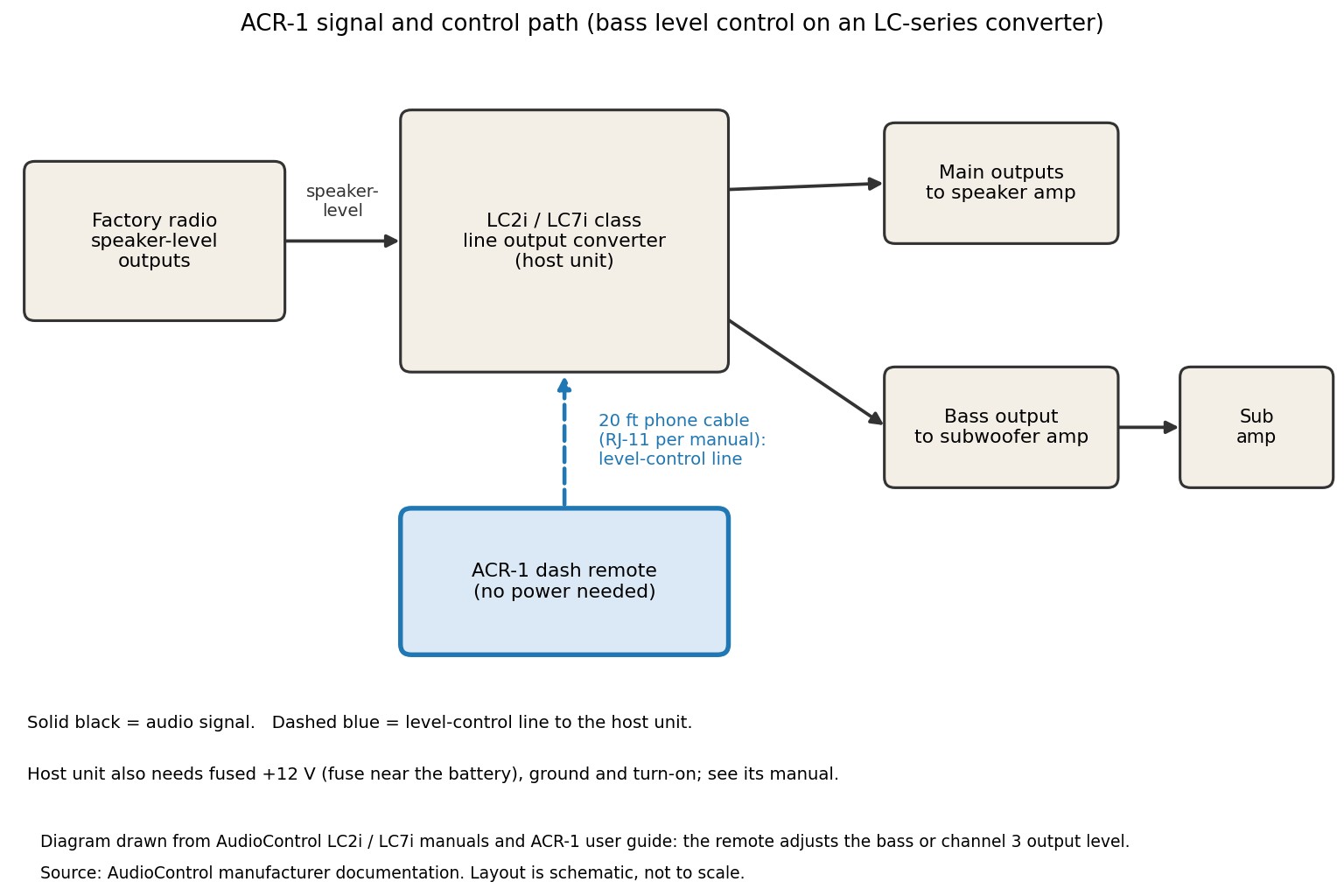
Its function depends on the host. The AudioControl LC7i manual says the ACR-1 adjusts the level of the channel 3/subwoofer output. The LC2i PRO manual describes it as a bass-output attenuator, and that converter includes the ACR-1 in the box. Other compatible amplifiers or processors may use the remote for their own supported level control. Read the manual for the exact host before deciding what the knob will change.
The bundle is another reason to check the precise model. Bundle details vary by host. The LC2i PRO manual includes the ACR-1, while AudioControl's product catalog lists it as optional with some other converters. If a used converter or amplifier is missing its original remote, confirm that the host model appears on the compatibility list and that the replacement cable is included.
AudioControl ACR-1 level range and what the figures mean
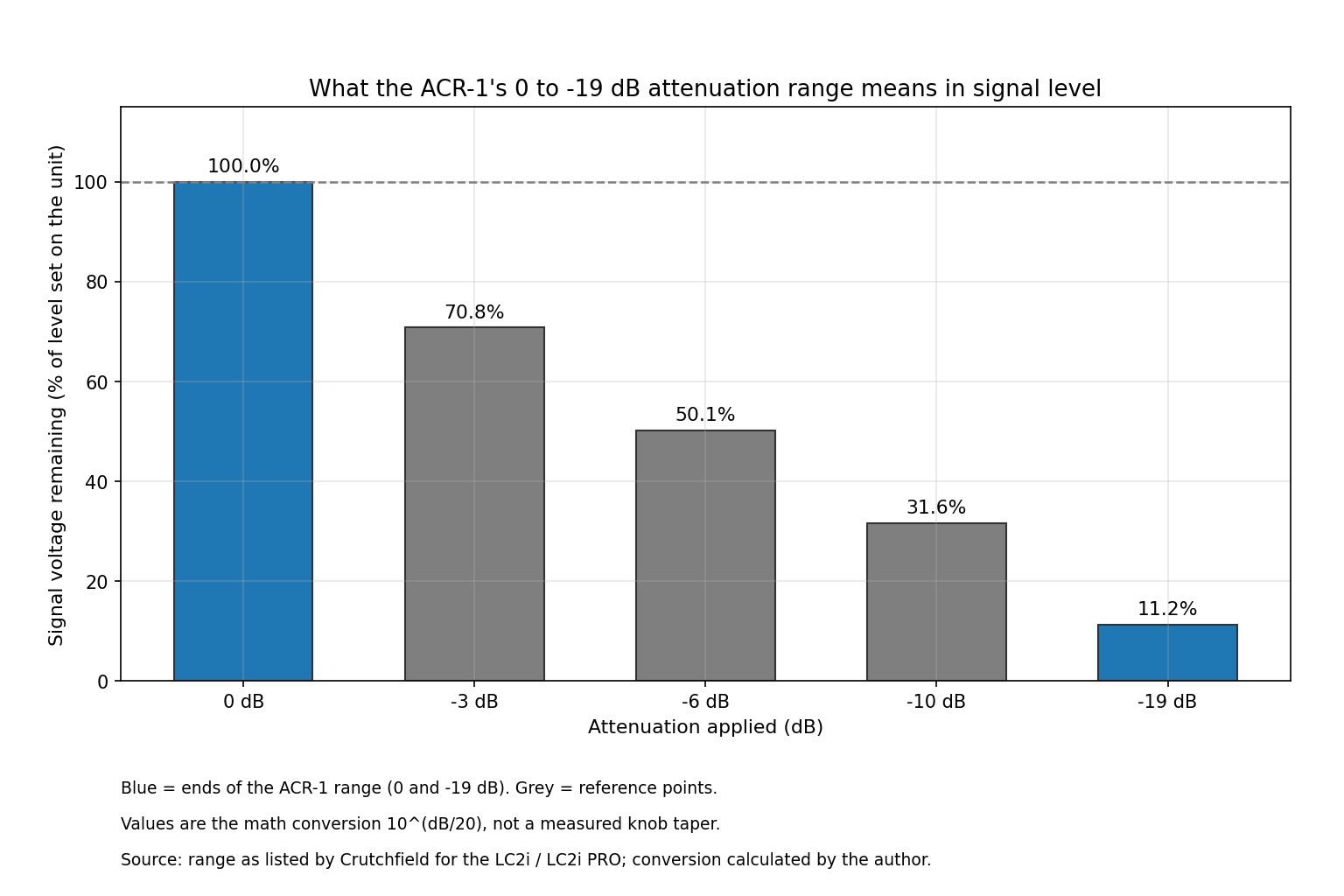
The ACR-1 does not generate or amplify a signal on its own. It adjusts the level of the compatible host output. On the LC2i PRO, AudioControl specifies a remote attenuation range of 0 dB to -19 dB and says that the remote controls the bass output. That range belongs to the LC2i PRO implementation; it should not be assumed to describe every product in the ACR-1 compatibility list.
The decibel figures can be translated into signal ratios. At -19 dB, the calculated voltage is about 11.2% of its full-level reference. Into the same load, that corresponds to about 1.26% of the power at the reference level. The knob therefore reduces the signal substantially but does not act as a guaranteed mute. The voltage calculation uses 10 to the power of the dB value divided by 20; the power calculation uses 10 to the power of the dB value divided by 10.
The published documentation does not give the knob's taper, so the positions around the dial cannot be mapped reliably to exact decibel steps. The maximum reduction also depends on the compatible host. Our research found no independent lab measurements for this model.
Installing the AudioControl ACR-1 safely
The user guide describes two mounting options. For a surface installation, hold the remote under the dash or console, mark the mounting holes, drill pilot holes and attach the bracket with screws. The guide describes four screws for the bracket method. Choose a position within reach of the driver where the LED remains visible without requiring the driver to look away from the road for long.
For a flush installation, AudioControl's guide specifies a 9/32 inch (7 mm) hole for the control, a 3/32 inch (2.3 mm) hole for the lock tab and a 1/8 inch (3 mm) hole for the LED. Check the panel thickness and clearance behind it before drilling. Avoid airbag covers, airbag deployment paths and hidden wiring; if the panel's rear layout is uncertain, use an installer rather than guessing.
The ACR-1 itself needs no power connection. Connect its supplied phone cable to the matching remote jack on the compatible AudioControl unit and route the lead away from pedals, steering mechanisms, sharp edges and moving parts. Secure excess cable so it cannot snag. Do not splice or extend the cable unless AudioControl confirms a supported method. The host converter or amplifier still needs its own correct power, ground and fuse arrangement, following that product's manual.
For daily use, set the host's output level correctly before relying on the dash control. The LC2i PRO manual describes the ACR-1 as an attenuator, so it turns the selected output down from the level set on the host rather than raising that ceiling. If bass level changes unexpectedly or the control does not affect the expected output, confirm the host model and remote jack before changing wiring or internal settings.
AudioControl ACR-1 compared with three other remote controls
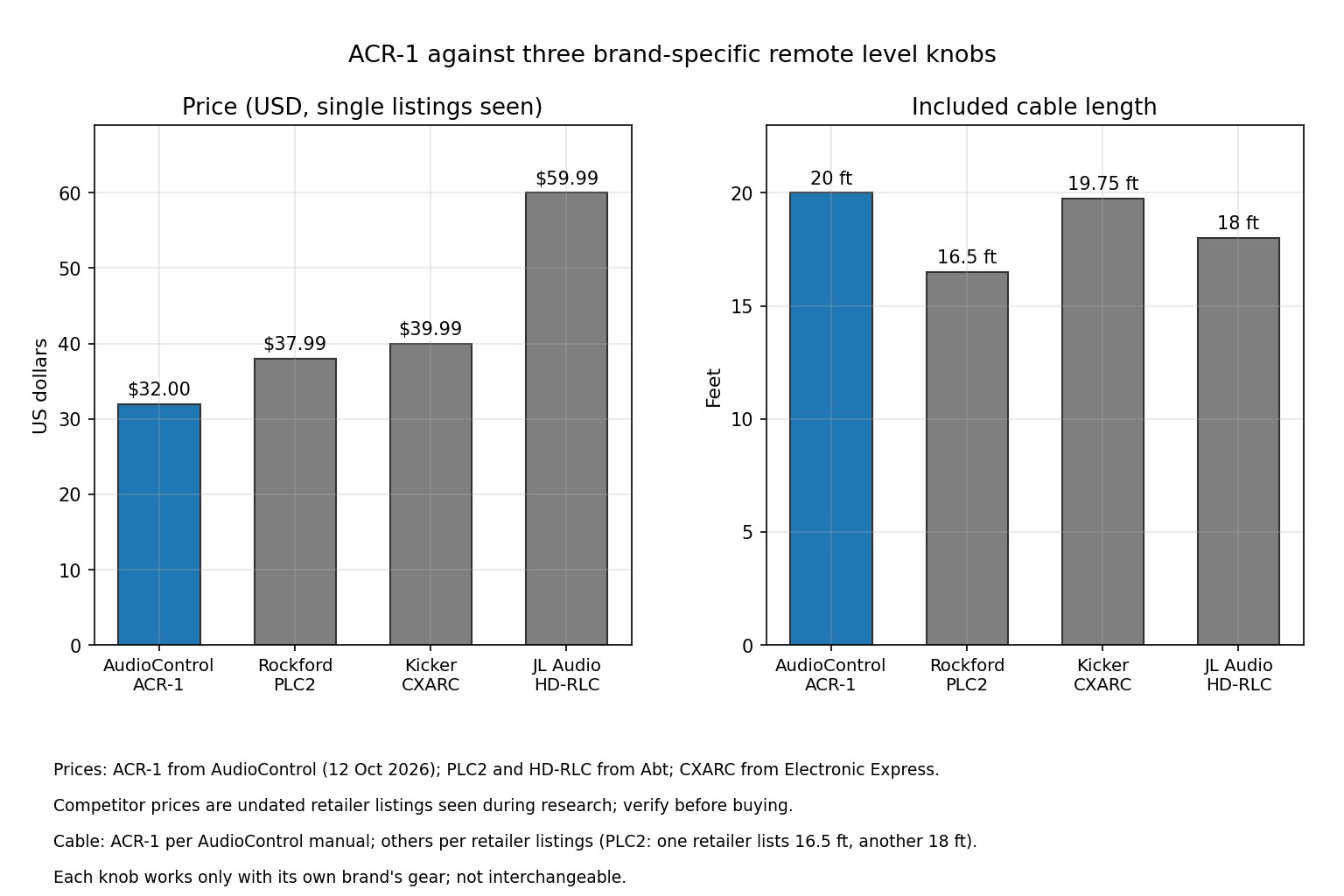
The Rockford Fosgate PLC2 is designed for select 2013-and-newer Punch and Power amplifiers, the KICKER CXARC fits supported CX, DX and PX amplifiers plus the KEY500.1, and the JL Audio HD-RLC serves selected HD-, XD-, MHD- and M-series amplifiers. Each remote depends on its brand's supported host hardware, so the main decision is compatibility first, then cable reach, controls and price.
| Feature | AudioControl ACR-1 | Rockford Fosgate PLC2 | KICKER CXARC | JL Audio HD-RLC |
|---|---|---|---|---|
| Listed price (USD) | $32.00 (AudioControl) | $37.99 (Abt) | $39.99 (Electronic Express) | $59.99 (Abt) |
| Compatible equipment | Selected AudioControl converters, processors and amps | Selected 2013+ Punch and Power amps | KEY500.1 and supported CX/DX/PX amps with remote bass jack | Selected JL Audio HD/XD/MHD/M-series amps |
| Included cable length | 20 ft | 18 ft (Crutchfield listing) | 19.75 ft | 18 ft |
| Control function | Host-dependent level control; bass level on LC2i PRO/LC7i use cases | Remote level attenuation; dual-function power/clipping LED | Remote bass level | Amplifier input-gain attenuation for overall level |
| Power connection at remote | Not required | Not confirmed in the opened product listings | Not confirmed in the opened product listings | Not confirmed in the opened product listing |
The ACR-1 has the longest stated cable in this group by a small margin and the lowest listed price among these four listings. Its advantage only matters if the host unit is compatible. The longer feature list does not make it useful with another brand's remote jack, and a cheaper generic knob should not be treated as an electrically equivalent substitute.
Who should buy the AudioControl ACR-1, and who should skip it
The ACR-1 makes sense when a compatible AudioControl unit needs a replacement remote, the original bundle did not include one, or a driver wants a reachable control for an output that the host manual identifies as adjustable. The 20 ft lead gives some flexibility in locating the remote, while its no-power design keeps the dash installation to a single control cable.
Skip it if the system uses an amplifier or processor that is not on AudioControl's compatibility list. Skip it as well if the host already came with the remote and the original is working, or if the goal is to increase bass beyond the level set on the converter. The ACR-1 does not replace a line output converter, a bass restoration processor or a universal volume control.
- Confirm the full host model and any model suffix against AudioControl's compatibility list.
- Check whether the remote and cable are already included with the host product or bundle.
- Measure the route from the host to the planned dash location and leave room for safe cable routing.
- Read the host manual to learn which channel or output the remote changes and whether it only attenuates.
- For an EPIC-series amplifier that specifically calls for the ACR-E, choose that compatible control instead of assuming the ACR-1 is interchangeable.
AudioControl ACR-1 price and buying checks
AudioControl lists the ACR-1 at $32.00. Prices change often, so check the current listing. Crutchfield lists the same model at a higher price, so warranty terms, returns and support may be worth comparing alongside the total cost.
Before ordering, confirm the host compatibility and the box contents. The manufacturer lists the ACR-1 and remote cable in the package; mounting screws and the exact hardware included should be confirmed with the seller if a flush installation is planned. The product page states a one-year manufacturer warranty. A third-party retailer may display different warranty wording, so get the coverage and any authorized-dealer conditions in writing.
Check the housing dimensions against the intended location, especially if the knob will sit in a tight console. For a flush mount, measure the control, lock-tab and LED holes from the user guide rather than relying on a product photo. The AudioControl ACR-1 listing is another place to check the exact model name and seller details before placing an order.
Final rating for the AudioControl ACR-1
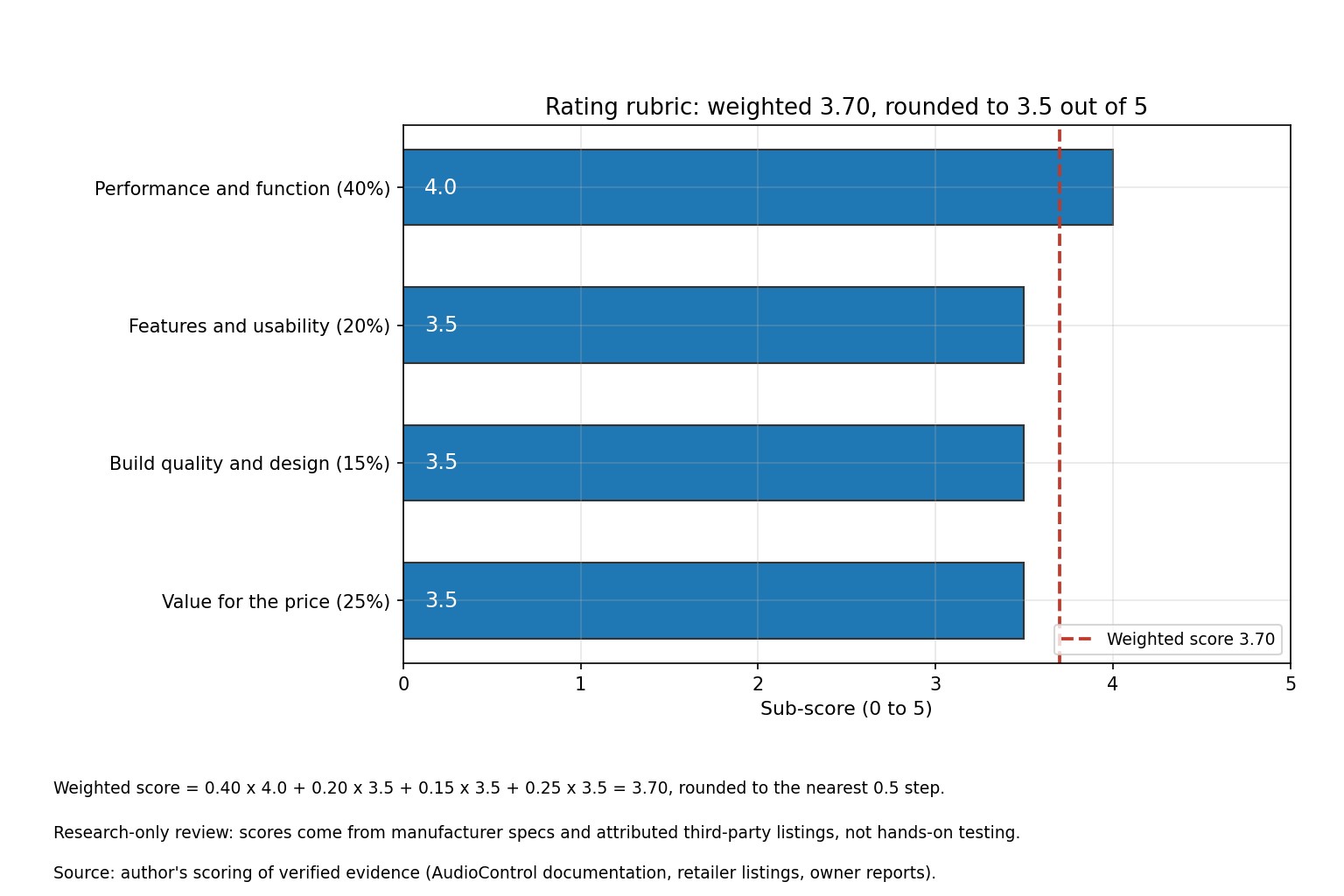
The ACR-1 earns a 3.5 out of 5. Its function scores 4.0 because the manufacturer documents a clear job across a broad list of compatible hosts. Features and usability score 3.5: cable length and two mounting options are useful, but control behaviour depends on the host and the dial's taper is not published. Build and design score 3.5 because the manufacturer confirms a metal housing and compact dimensions, while detailed durability data is not listed. Value scores 3.5 because the $32 manufacturer price is lower than the three comparison listings, but the product is useful only with compatible AudioControl gear.
| Criterion | Weight | Score (0-5) | Weighted points |
|---|---|---|---|
| Performance and function | 40% | 4.0 | 1.60 |
| Features and usability | 20% | 3.5 | 0.70 |
| Build quality and design | 15% | 3.5 | 0.525 |
| Value for the price | 25% | 3.5 | 0.875 |
| Weighted result | 100% | 3.70, rounded to 3.5 | 3.70 |
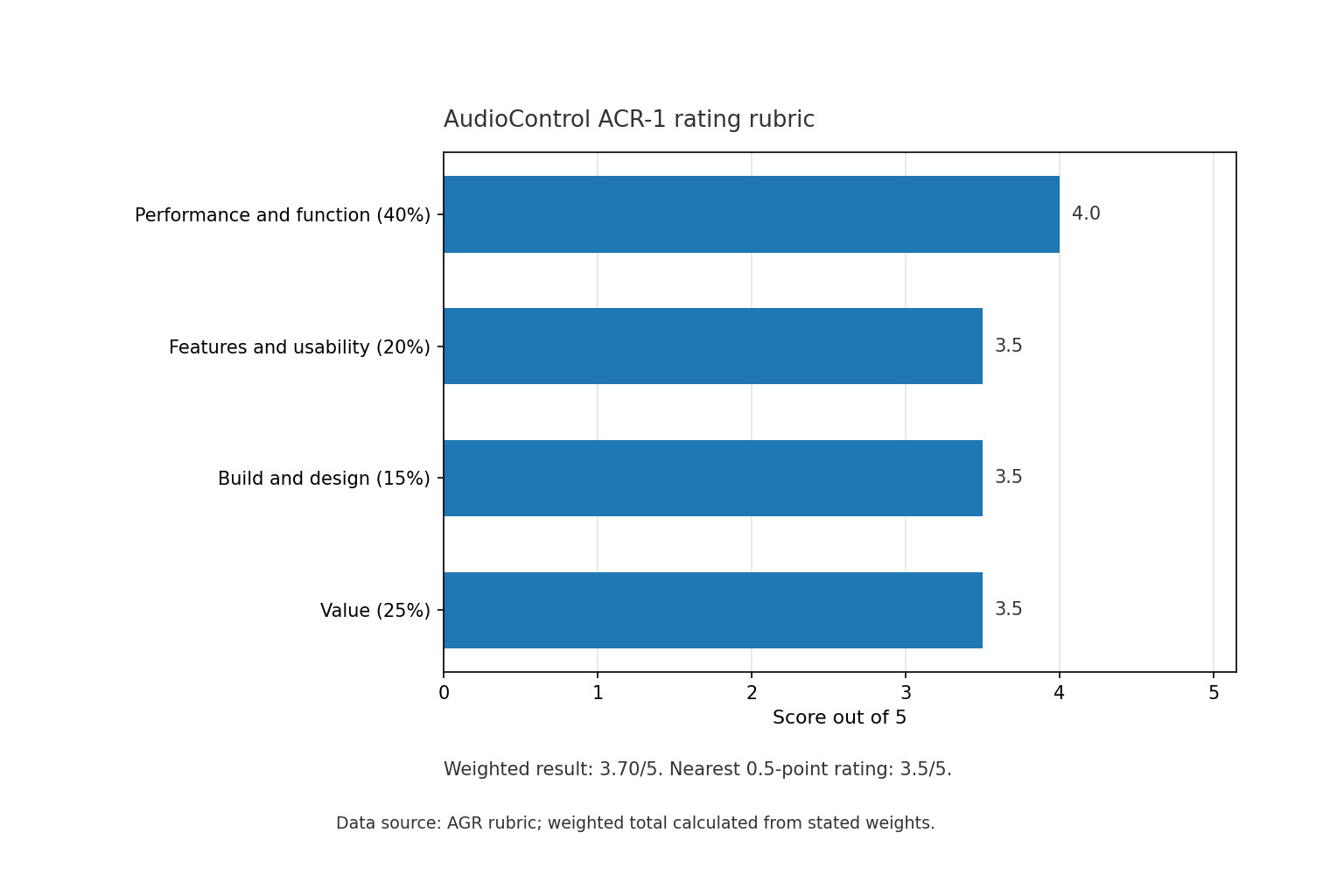
Our research score is based on the rated figures and documented details above.
Sources and further reading
- AudioControl ACR-1 product page (price, compatibility, housing, dimensions, weight and package contents)
- AudioControl ACR-1 user guide (cable, no-power design and mounting-hole dimensions)
- AudioControl LC7i manual (remote function on the subwoofer output)
- AudioControl LC2i PRO manual (included remote and specified attenuation range)
- AudioControl ACR-E product page (separate EPIC-series remote compatibility)
- KICKER CXARC product page (compatible amplifiers and cable length)
- Electronic Express listing (listed price and included cable details)
- Rockford Fosgate PLC2 retailer listing (price and documented product features)
- Rockford Fosgate PLC2 cable and compatibility details (cable length and supported amplifier models)
- JL Audio HD-RLC retailer listing (price, supported amplifier families and cable length)
AudioControl ACR-1 FAQ
Which AudioControl products work with the ACR-1?
AudioControl lists the Epicenter Concert Series, LC2i, LC2i Pro, LC5i Pro, LC6i, LC7i, LC7i Pro, Matrix Plus and several LC-series, A-series and ACX amplifiers. Older LC6, LC8, Overdrive Plus and 6XS units are listed as legacy support. Always check your exact model against AudioControl's current list before buying.
Does the ACR-1 work with AudioControl EPIC series amplifiers?
EPIC series amplifiers are not on the ACR-1 compatibility list. AudioControl sells a separate knob, the ACR-E, for EPIC series amplifiers only. Buy the one that matches your amplifier.
Does the ACR-1 need its own power?
No. AudioControl's user guide says installation is simple and no power is required. The converter or amplifier it plugs into still needs correctly fused power.
Can the ACR-1 make the bass louder than the unit's own dial?
Not on the LC2i PRO. Crutchfield notes the remote will not raise the bass output past the top-panel dial setting, and the listed range is 0 dB to -19 dB. Set the unit's dial to your maximum, then use the ACR-1 to turn down from there.
Is the ACR-1 worth the money?
AudioControl's own price is $32, and many third-party sellers charge about $45. That is reasonable if you need a replacement or want remote control on a supported unit. It is not worth buying if your converter already included one.
Do I need to buy the ACR-1 separately with an LC2i PRO?
Usually not, since AudioControl lists the LC2i PRO with an ACR-1 included. The plain LC2i lists it as optional, and one LC2i bundle includes it. Check your box or the seller's listing before ordering.
How do I mount the ACR-1 in the dash?
You can fix the bracket under the dash or console with four screws, or flush mount it by disassembling the remote and drilling three holes. AudioControl lists 9/32 inch (7 mm) for the control, 3/32 inch (2.3 mm) for the lock tab and 1/8 inch (3 mm) for the LED. Check behind the panel for wiring and airbag components before drilling.
What warranty does the ACR-1 have?
AudioControl's current product page lists a one-year manufacturer warranty. Some retailer pages still show five years, which conflicts with that. Confirm the warranty terms with your seller before you buy.