Car Navigation
Eclipse AVN2454 Review: Specs, Wiring and Installation Notes
Published October 8, 2026
A specification and research review of the Eclipse AVN2454, a mid-2000s 2-DIN DVD navigation head unit: verified wiring, GPS and install notes, plus limits.
The Eclipse AVN2454 is a 2-DIN, in-dash receiver from the mid-2000s that combines a 6.5-inch touch screen, a CD/DVD player, a radio and DVD-based navigation in one chassis. If you are deciding whether to buy a used one, wire one into a car, or replace one, the short answer is that it is a well-documented, sensibly built legacy unit, but its map data, screen and connectivity are far behind a modern phone-based system.
Short version: The AVN2454 is worth considering only as a period-correct, all-in-one install in an older car, or if you already own one. It has a documented 4 x 50 W (maximum) internal amplifier, front, rear and non-fader line outputs, and a GPS antenna that needs careful placement. It has no Bluetooth, USB or smartphone mirroring listed in the sources I could verify, and its map disc is old. This is a specification-and-research review: I have not tested, heard or installed one.
Everything below is based on the manufacturer installation manual, the owner's manual listings, and a magazine-style specification sheet reposted on a forum. Where a number comes only from that repost, I say so. I did not run any measurements, and I will not describe sound quality, because I have no listening data for this unit.
Key specifications
The table separates figures confirmed in the manufacturer installation manual from figures that appear only in a secondary source. Treat the second group as "reported", not guaranteed.
| Item | Value | Source quality |
|---|---|---|
| Product type | 6.5-inch wide TFT touch-panel CD/DVD multi-source receiver with DVD navigation | Manufacturer installation manual |
| Brand / maker | Eclipse, by Fujitsu Ten | Manufacturer installation manual |
| Vehicle electrical system | 12 V DC, negative ground only; not for 24 V vehicles | Manufacturer installation manual |
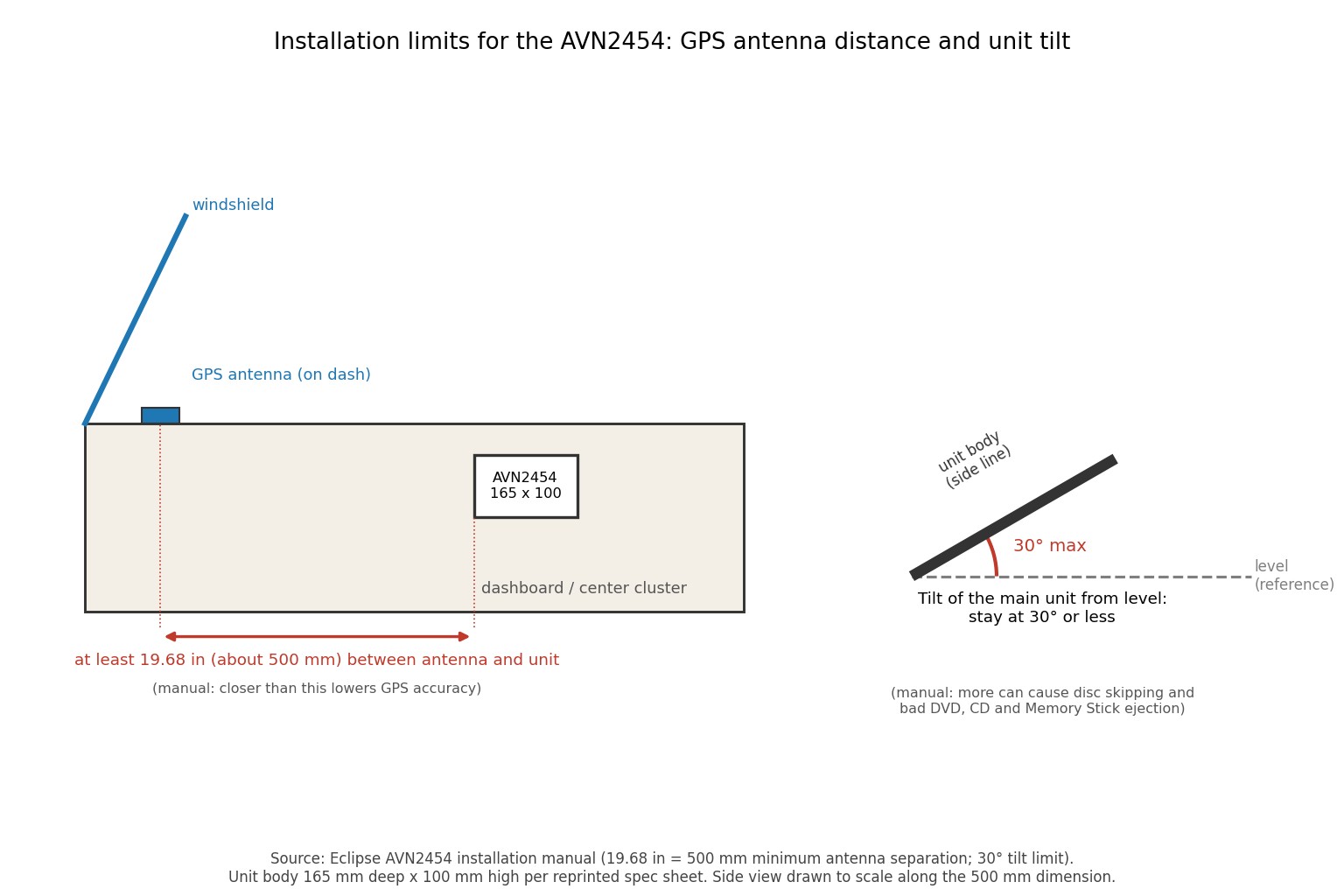
| Maximum mounting angle | 30 degrees or less from level | Manufacturer installation manual |
| GPS antenna distance from main unit (inside the car) | At least 19.68 in (about 500 mm) | Manufacturer installation manual |
| Amplifier output | 50 W x 4 (maximum) | Reported in a reposted spec sheet |
| Line-out level | 0.8 V | Reported in a reposted spec sheet |
| Supply voltage | 13.2 V DC (11 to 16 V) | Reported in a reposted spec sheet |
| Chassis size (W x H x D) | 180 x 100 x 165 mm | Reported in a reposted spec sheet |
| Weight | 3.7 kg (about 8.2 lb) | Reported in a reposted spec sheet |
| Screen | 6.5-inch, 16:9, 400 x 234 x 3 = 280,800 dots | Reported in a reposted spec sheet |
| Launch price | MSRP $2,199 | Reported in a reposted spec sheet and a for-sale post |
One caution on size: the same repost lists the dimensions in inches as 7-1/2 x 4-1/2 x 6-1/2. Converting those gives about 190 x 114 x 165 mm, which disagrees with the millimetre figures for width and height. Only the depth matches. I quote the millimetre values because they match the standard 2-DIN opening, but check the unit against your dash before cutting anything.
Design and features
The AVN2454 is a single-box design. The installation manual lists the main unit, a GPS antenna, a map DVD-ROM, interconnecting cables and mounting hardware, with no separate navigation computer. That is its main selling point for an installer: one chassis in the 2-DIN opening, one harness set, one GPS antenna cable to route.
From the owner's manual contents list and a for-sale description, the unit plays CDs, MP3 discs and DVD video, has a tuner, and can control a CD changer. It also lists a video input for external equipment, a rear-camera input for Eclipse's own camera, and a video output. The contents list also includes screen modes (Wide 1, 2 and 3), equalizer adjustment and a seat-position setting for balancing sound toward a listening position. The reposted spec sheet gives a graphic equalizer range of plus or minus 10 dB per band.
Audio outputs
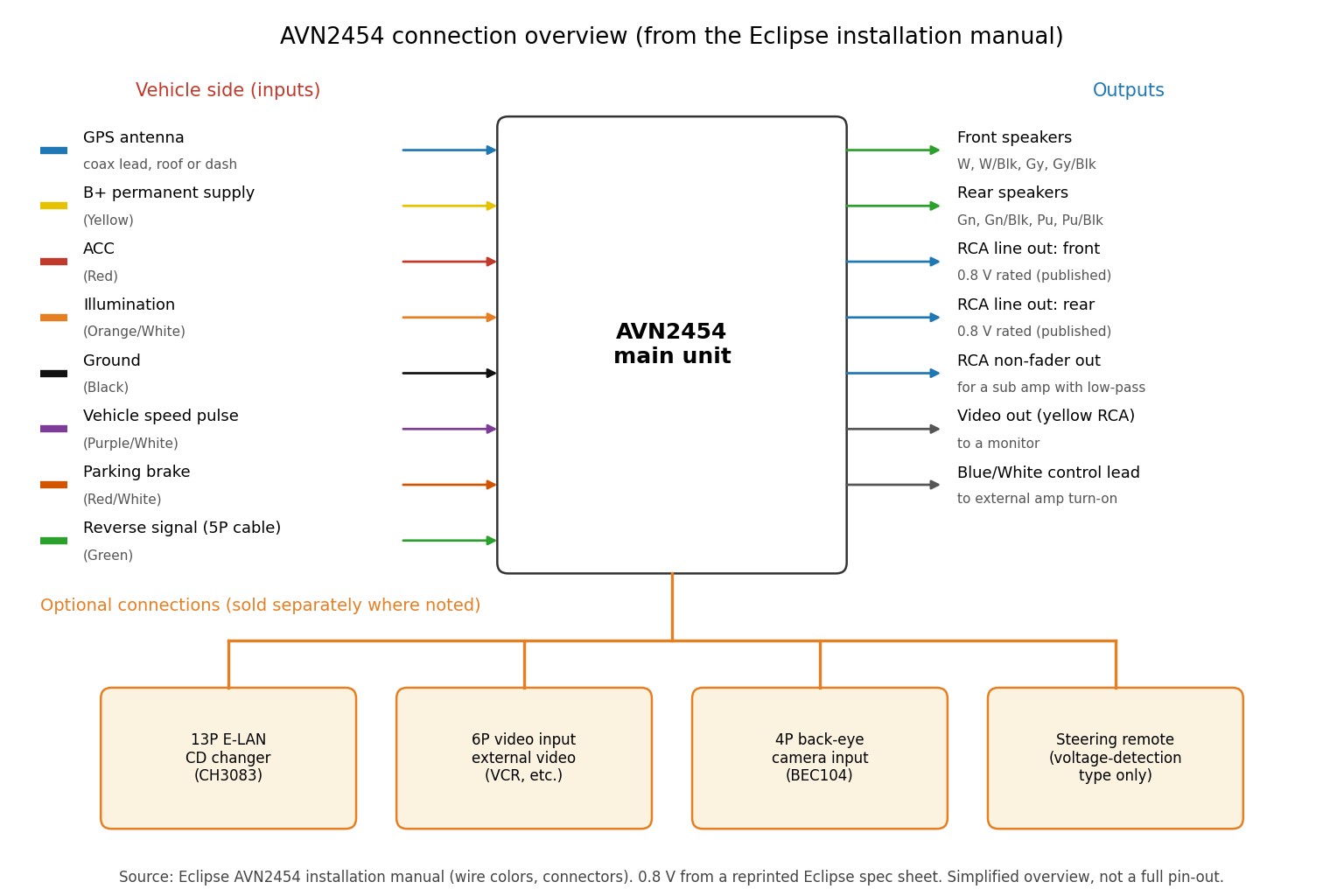
The unit has speaker-level outputs for front and rear speakers, plus three line-level (RCA) output pairs: front, rear and a "non-fader" output. The manual says the non-fader output can serve as a subwoofer output if you connect a separate amplifier that has its own low-pass filter. That wording matters: the receiver does not describe a built-in crossover on that output, so the external amplifier should do the filtering.
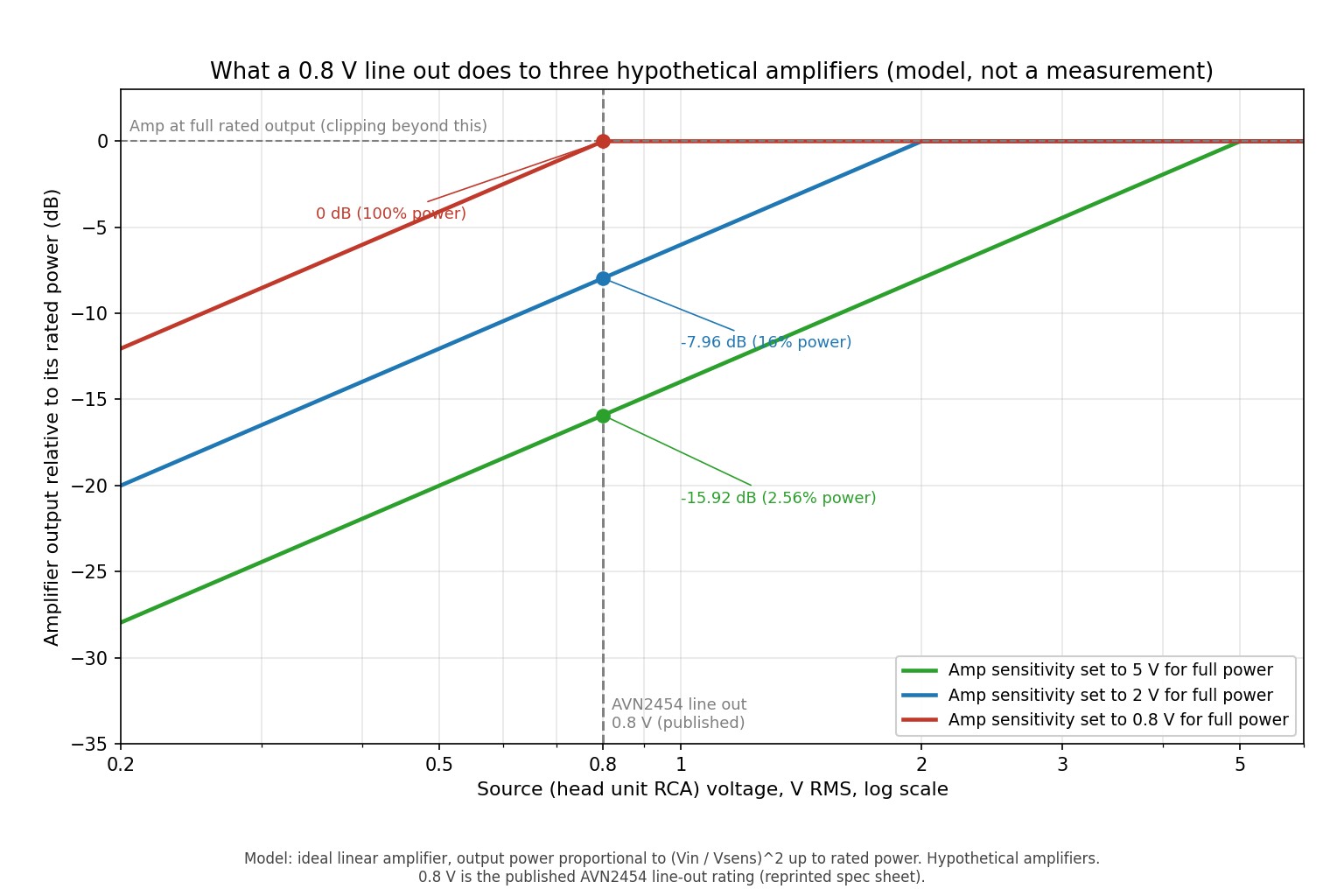
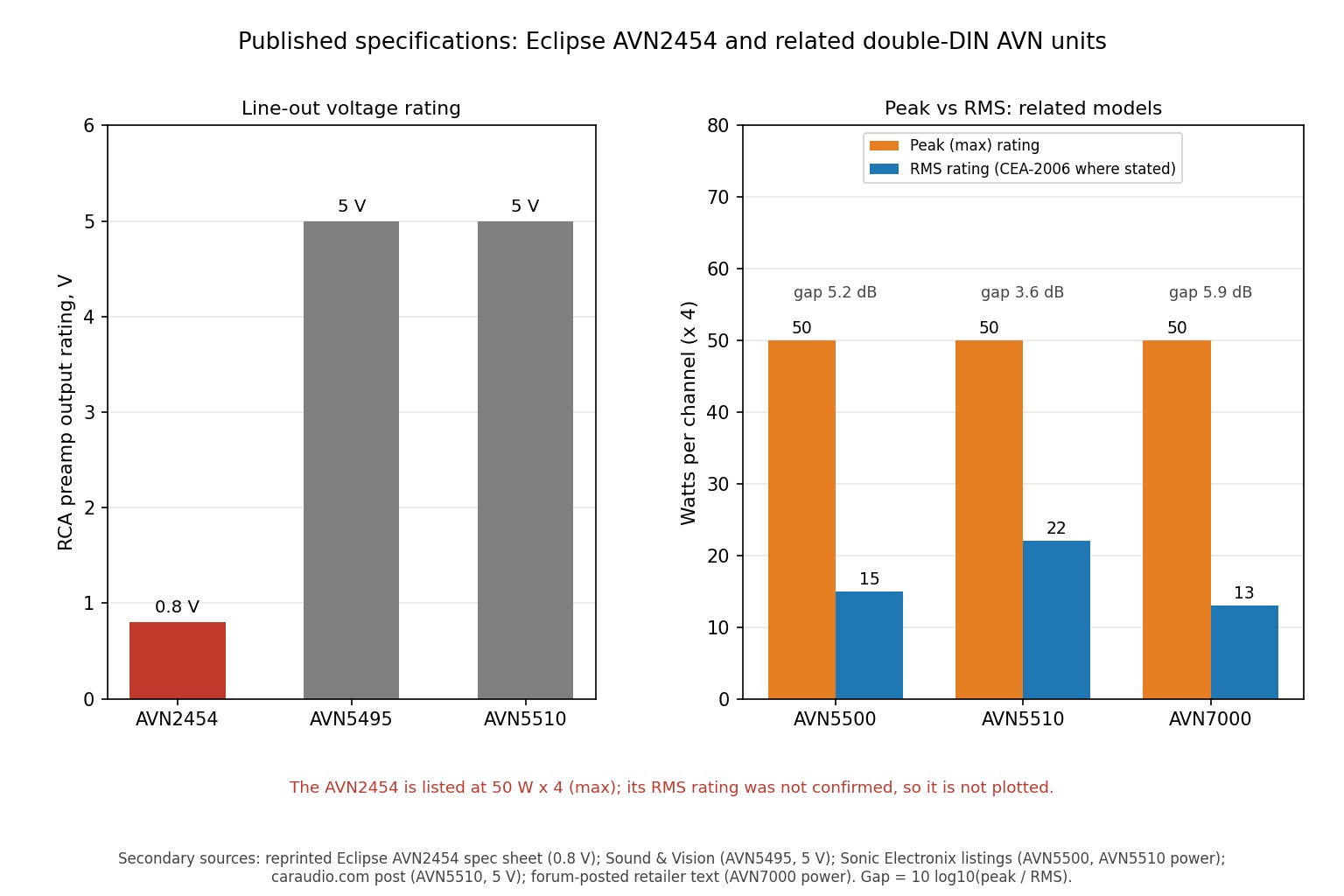
The reported line-out level is 0.8 V. That is a lower preout voltage than the 4 V to 5 V figures that became common on later head units. The difference between 5 V and 0.8 V is about 15.9 dB (20 x log10(5 / 0.8)). In practice, that means an external amplifier will need more input gain to reach full output, which can raise the noise floor if the gain control is pushed far. This is a calculation from the reported figure, not a measured result.
Installation and setup notes
Safety note: Disconnect the vehicle battery's negative terminal before wiring. Never splice into the unit's power lead to feed other equipment, use only the specified fuse rating, and do not mount the unit where it could obstruct airbag deployment. Cutting panels and drilling involve injury and fire risks: confirm the location of wiring, hoses and the fuel tank first. Professional installation is recommended by the manufacturer.
Power and speaker wiring
The manufacturer describes the harness colours as follows. Always confirm against your vehicle adapter harness, because adapter wiring varies.
| Function | Wire colour |
|---|---|
| Constant power (B+) | Yellow |
| Ignition-switched power (ACC) | Red |
| Illumination | Orange/white |
| Power antenna control | Blue |
| External amplifier or equipment control | Blue/white |
| Ground | Black |
| Front left (+ / -) | White / white-black |
| Front right (+ / -) | Gray / gray-black |
| Rear left (+ / -) | Green / green-black |
| Rear right (+ / -) | Purple / purple-black |
The manual warns never to connect a power supply to the speaker leads, because that damages the main unit. It also says a popping noise at engine start or when the ignition reaches ON is normal. The blue/white lead is the one to use for an external amplifier's remote input; the manual says that when used this way you can still hear navigation voice guidance while audio is turned off.
The three navigation signals
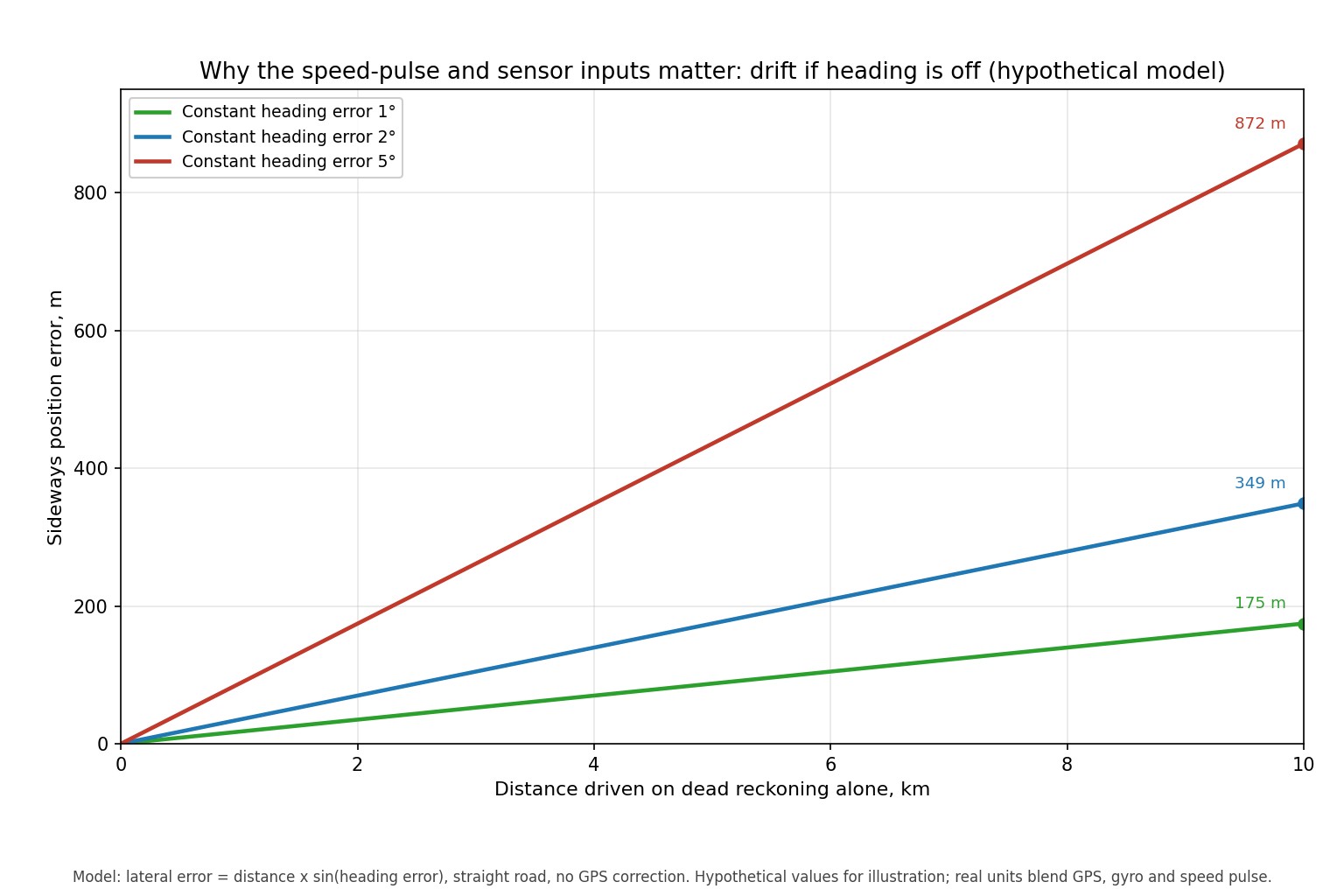
The unit needs three vehicle signals: vehicle speed pulse (purple/white), parking brake (red/white) and reverse (green). The manual states plainly that if any of these is not connected, measurement precision is greatly reduced. The speed pulse cable carries a labelled protection circuit, and the manual says not to cut it or remove the label. Connections are made with the supplied splicing connectors. If you do not know where these signals live in your car, ask a dealer or consult a vehicle-specific wiring source, because the locations vary by model and grade.
GPS antenna placement
The antenna can go inside on the dashboard, using the supplied ground plate, or outside using the magnet and body protective sheet. The manufacturer says to keep an in-car antenna at least 19.68 in (about 500 mm) from the main unit, to give it a flat position with a clear view of the sky, and to avoid places shielded from the sky such as front pillars. If the windshield angle or glass coating weakens reception, the manual suggests moving the antenna outside. Route the antenna cable away from radio and TV antenna cables, which can cause interference.
The antenna magnet is described as extremely strong. Keep it away from watches and magnetic cards, and do not set it on dirty surfaces where iron filings can stick and scratch paint. If it is mounted outside, remove it when washing the car or leaving it unattended for long periods.
Mounting
Mount the unit at 30 degrees or less from level, or discs may skip and eject improperly. Use the supplied M5 x 8 screws, connect all cables before sliding the unit in, and keep the harness from touching sharp metal edges. The unit is for 12 V negative-ground cars only, so it should never go into a 24 V truck system.
What to check and how it should perform
I have no test data for this unit, so this section is a checklist for a used purchase, not a performance claim.
- Map disc version. Third-party marketplace listings show map discs, including a version labelled 3.5, advertised for the AVN2454 and related models. I could not verify the coverage, accuracy or authenticity of these discs. Any map from this era will lack many roads built since.
- Motorised screen and disc slots. The face slides down to expose the disc slots, so ask the seller to show the full open and close movement and a disc eject.
- GPS lock. A working unit needs a clear antenna view; test outside a building with the antenna in its final position.
- Accessories. Confirm the harness, GPS antenna and map disc are included. A missing proprietary camera or cable adds cost.
- Audio outputs. Test front, rear and non-fader line outputs if you plan to use an outboard amplifier.
Worked example: supply current (hypothetical install)
Take the reported 4 x 50 W maximum output at 13.2 V. The total is 200 W, so the absolute minimum current is 200 / 13.2 = about 15.2 A, even if the amplifier were 100 percent efficient. If it were 60 percent efficient, a figure I am assuming only for illustration, the draw would be about 25.3 A at full output. Real use is far below maximum power, but this is why the manufacturer insists on the specified fuse rating and why you should never tap the power lead for other equipment. The model ignores speaker impedance, music crest factor and the unit's other loads.
Pros and cons
Pros
- All-in-one 2-DIN design with no separate navigation box.
- Documented front, rear and non-fader line outputs for adding amplifiers.
- A thorough manufacturer installation manual with wire colours and clear safety notes.
- Optional CD changer and external video inputs.
Cons
- Navigation depends on an old DVD map that I could not verify as current.
- Low reported line-out level (0.8 V) compared with later head units.
- The sources I checked do not list Bluetooth, USB or smartphone connectivity.
- Needs three vehicle signal connections for accurate navigation, which makes installation slower.
- Low screen resolution by today's standards (400 x 234 pixel groups).
Who it is for and not for
It suits restorers who want a period-correct, integrated look in a car from the same era, owners replacing a failed identical unit, and people who prefer one box without a phone mount. It does not suit anyone who wants current maps, live traffic, hands-free calling or music streaming from a phone. For those needs, a phone with a mount, or a modern single- or double-DIN receiver, will do far more for far less money.
Alternatives
| Option | Strength | Trade-off |
|---|---|---|
| Modern 2-DIN receiver with smartphone mirroring | Current maps, calling and streaming through the phone | Needs a compatible phone; a different look from an era-correct unit |
| Phone on a dash mount | No install; always the newest maps | Phone battery, mount placement and no integration with the car audio |
| Other Eclipse AVN units of the same period | Same brand and similar install approach | Specifications differ; verify each model before buying |
Buying advice
If you find one, price it as a legacy part, not a navigation system. Launch price was $2,199 (reported), but today's value comes from condition, completeness and whether you need it for a specific car. Ask for photos of the connectors, confirmation that the screen movement works, and proof that the GPS antenna is included. Budget for a vehicle-specific adapter harness, and consider professional installation, because the speed, brake and reverse connections are where most mistakes happen.
Common mistakes
- Skipping the speed pulse, parking brake or reverse connection, then wondering why the position drifts.
- Mounting the GPS antenna on the dash directly beside the head unit instead of keeping it about 500 mm away.
- Cutting the speed pulse protection circuit label.
- Feeding speaker leads with power, which damages the unit.
- Setting amplifier gain by guesswork instead of accounting for the low line-out level.
Final verdict
The AVN2454 is a competently documented 2-DIN navigation receiver that made sense when it was new, and it can still serve a classic-car install. Judged by today's standards, its map data, connectivity and screen are limited. Buy one for a reason, such as fitment or originality, not for navigation quality. This verdict rests on published specifications, not hands-on use.
Sources and further reading
- Eclipse AVN2454 installation manual (manufacturer PDF)
- Eclipse AVN2454 manual listing on ManualsLib (owner's, reference and installation manuals)
- Forum repost of the AVN2454 specification sheet (secondary source, used only for figures marked as reported)
Last reviewed: October 2026
Eclipse AVN2454 Questions Answered
Does the Eclipse AVN2454 have Bluetooth or USB?
None of the sources I checked list Bluetooth, USB or smartphone mirroring for this model. It is documented as a CD/DVD receiver with DVD navigation, a tuner and external video and changer inputs. Confirm with the seller if you need either feature.
Where do the speed pulse, parking brake and reverse wires connect?
The harness uses purple/white for vehicle speed pulse, red/white for parking brake and green for reverse. Their locations in the car depend on the model and grade, so check a vehicle-specific wiring source or ask a dealer.
How far should the GPS antenna be from the head unit?
For an in-car installation, the manufacturer says at least 19.68 in, which is about 500 mm. Keeping it closer reduces GPS accuracy. A flat spot with a clear view of the sky works best.
Can I add an amplifier or subwoofer?
Yes. The unit has front, rear and non-fader line outputs, and a blue/white remote lead for amplifier turn-on. The manufacturer says the non-fader output can feed a subwoofer amplifier, provided that amplifier has its own low-pass filter.
Is the 0.8 V line-out level a problem?
It is lower than the 4 V to 5 V preouts on many later units, so an amplifier may need more input gain. That can raise noise if the gain is pushed high. Set the gain carefully, ideally with test tones and a meter.
Are map updates available?
Third-party sellers list map discs for this model family, but I could not verify their coverage, version history or authenticity. Assume the maps are old and missing recent roads. Check what disc comes with a used unit.
Can I use the AVN2454 in a 24 V truck?
No. The manufacturer states the unit is for 12 V DC negative-ground vehicles only. Using it in a 24 V system could damage it and create a fire risk.
Is the AVN2454 still sold new?
I could not find a current manufacturer page listing it for sale, and it appears to be a mid-2000s design. Current availability is not confirmed. Expect to find only used or old-stock units.